HTTP
The undelying network protocol for communication on the web. It defines methods like GET, POST, PUT, and DELETE.
When you visit a website, your browser sends HTTP requests and the server sends back HTTP responses.
HTTP 消息是客户端和服务器之间通信的基础,它们由一系列的文本行组成,遵循特定的格式和结构。
HTTP消息分为两种类型:请求消息和响应消息。
一个 HTTP 客户端是一个应用程序(Web 浏览器或其他任何客户端),通过连接到服务器达到向服务器发送一个或多个 HTTP 的请求的目的。
一个 HTTP 服务器 同样也是一个应用程序(通常是一个 Web 服务,如 Nginx、Apache 服务器或 IIS 服务器等),通过接收客户端的请求并向客户端发送 HTTP 响应数据。
Client Side Request
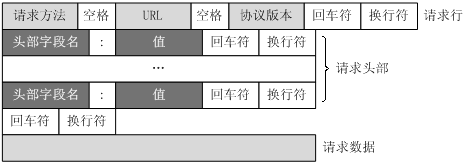
请求行(Request Line):
- 方法:如 GET、POST、PUT、DELETE等,指定要执行的操作。
- 请求 URI(统一资源标识符):请求的资源路径,通常包括主机名、端口号(如果非默认)、路径和查询字符串。
- HTTP 版本:如 HTTP/1.1 或 HTTP/2。
请求行的格式示例:GET /index.html HTTP/1.1
请求头(Request Headers):
- 包含了客户端环境信息、请求体的大小(如果有)、客户端支持的压缩类型等。
- 常见的请求头包括Host、User-Agent、Accept、Accept-Encoding、Content-Length等。
空行:
请求头和请求体之间的分隔符,表示请求头的结束。
请求体(可选):
在某些类型的HTTP请求(如 POST 和 PUT)中,请求体包含要发送给服务器的数据。
Server Side Response
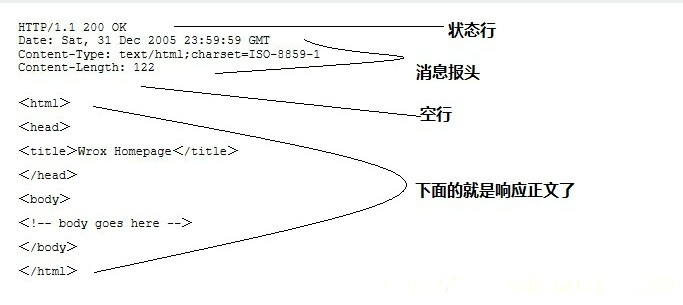
状态行(Status Line):
- HTTP 版本:与请求消息中的版本相匹配。
- 状态码:三位数,表示请求的处理结果,如 200 表示成功,404 表示未找到资源。
- 状态信息:状态码的简短描述。
状态行的格式示例:HTTP/1.1 200 OK
响应头(Response Headers):
- 包含了服务器环境信息、响应体的大小、服务器支持的压缩类型等。
- 常见的响应头包括Content-Type、Content-Length、Server、Set-Cookie等。
空行:
响应头和响应体之间的分隔符,表示响应头的结束。
响应体(可选):
包含服务器返回的数据,如请求的网页内容、图片、JSON数据等。
FormData
- multipart/form-data is an encoding type (media or content type) used in HTTP requests to send data to a server, primarily for forms that include file uploads.
- In HTML, you specify this encoding by setting the enctype attribute of the <form> tag to multipart/form-data when the method is POST. This is mandatory if your form includes an <input type=”file”> element.
1 | <form action="/upload" method="post" enctype="multipart/form-data"> |
- When using modern web APIs like the Fetch API or XMLHttpRequest in JavaScript, the browser’s FormData object automatically handles the complex process of structuring the request in the multipart/form-data format.
- WWWForm is a Unity class used to create a standard web form. It structures data into the multipart/form-data or x-www-form-urlencoded format, which is a standard format for submitting form data, including file uploads, to web servers.
REST API
- A set of architectural constraints (like statelessness and uniform interface) that define how to build scalable and standardized web services, primarily using HTTP.
- Guidelines for designing a server’s endpoints in a logical, resource-oriented way, specifically origanize resources in URIs like https://exmaple.com/api/v3/users
- For example, a REST API would use GET /users to retrieve users, POST /users to create a new user, and leverage standard HTTP status codes.
Fetch API
- A modern, promise-based JavaScript interface built into web browsers that allows developers to make HTTP requests programmatically.
- Client-side tool used to consume a service that might be RESTful (or any other kind of HTTP API).
- You use the Fetch API in JavaScript in your web browser or a server environment like Node.js to send the HTTP requests defined by the API’s design.
In summary, you use the Fetch API to send HTTP requests to a server that is structured as a REST API.
XHR
XML Http Request (XHR) is a JavaScript API to create HTTP requests. Its methods provide the ability to send network requests between the browser and a server. The Fetch API is the modern replacement for XMLHttpRequest
ASP.NET
Microsoft’s open-source framework for building web applications and and services using .NET and C#; it is fundamentally built on top of the HTTP protocol.
- HTTP/2 & HTTP/3: Modern versions of ASP.NET Core support HTTP/2 and HTTP/3 for improved performance.
- Status Codes: The framework provides built-in methods to return standard HTTP status codes, such as Ok() (200), CreatedAtAction() (201), or NotFound() (404).
Handling Incoming HTTP Requests (Server-Side)
- HTTP Servers: ASP.NET Core uses Kestrel, a cross-platform HTTP server, as the default to listen for requests.
- HttpContext: Every request is encapsulated in an HttpContext object, which provides access to the Request (headers, body, query strings) and the Response.
- Routing and HTTP Methods: Controllers use attributes like [HttpGet], [HttpPost], and [HttpPut] to map specific HTTP verbs to C# methods.
1 | var builder = WebApplication.CreateBuilder(args); |
Making Outgoing Requests (Client-Side)
To consume other web services or APIs from within your ASP.NET application, you use the HttpClient class.
1 | public class MyService |
Credits
https://www.runoob.com/http/http-messages.html